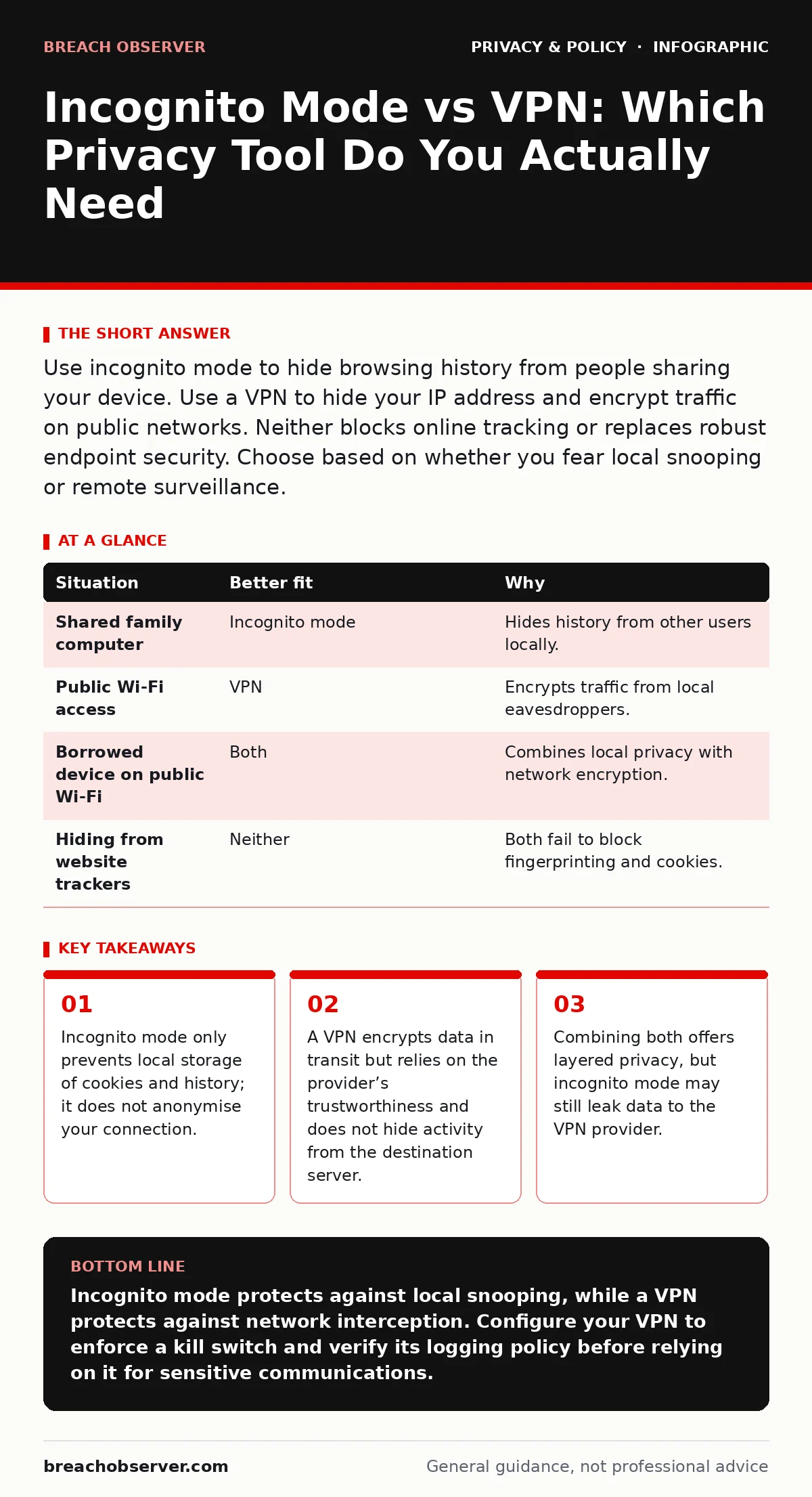
Use incognito mode to hide browsing history from people sharing your device. Use a VPN to hide your IP address and encrypt traffic on public networks. Neither blocks online tracking or replaces robust endpoint security. Choose based on whether you fear local snooping or remote surveillance.
Does anyone else use this device?
If you share a laptop, tablet or phone with family members or colleagues, your browser history becomes a public record. Incognito mode, also known as private browsing, prevents the browser from saving cookies, form data or visited pages to the local hard drive. This stops the next person who picks up the device from seeing what you looked up. However, it does not hide your activity from the internet service provider, the website you visit or any malware installed on the machine.
Suppose you borrow a colleague’s laptop to check a personal email. Using incognito mode ensures they cannot view your history later. It offers no protection if the device has keylogging software or if the network administrator monitors traffic. For deeper local security, consider reading our guide on password managers for families to ensure credentials are not reused across shared environments.
Is the network trustworthy?
When you connect to public Wi-Fi, your data travels through an unsecured router. Without encryption, anyone on the same network can intercept your traffic. A virtual private network creates an encrypted tunnel between your device and a remote server. This prevents local eavesdroppers from reading your data. It also masks your real IP address, making it harder for the network operator to link traffic to your specific device.
Imagine you are working from a café. A malicious actor on the same Wi-Fi could theoretically capture unencrypted login details. A VPN stops this interception. It does not, however, protect you from phishing sites or malware. For a broader understanding of network vulnerabilities, see our analysis of public Wi-Fi risks.
Are you trying to hide from websites?
Many users believe incognito mode or a VPN stops online tracking. This is a common misconception. Websites use cookies, device fingerprinting and other techniques to identify you. Incognito mode clears cookies after the session ends, but during the session, trackers still work. A VPN hides your IP address, but the website can still fingerprint your browser configuration, screen resolution and installed fonts.
To understand how persistent these methods are, review our guide on online tracking. Neither tool provides true anonymity. If you wish to limit data collection at the source, you must adjust browser settings and install tracker-blocking extensions. Legal frameworks like legitimate interest under the GDPR offer some recourse, but technical prevention is more immediate.
Who holds the keys to your data?
A VPN provider can see your decrypted traffic unless they implement strict no-log policies. Incognito mode keeps data local, but it does not encrypt it. If you use incognito mode with a VPN, the browser still sends data through the VPN tunnel. The VPN provider could theoretically log your activity, even if your browser does not save it locally.
This creates a hidden trade-off. You gain network-level privacy but rely entirely on the VPN provider’s integrity. If the provider is compelled to hand over data, your incognito session offers no additional shield. For organisations designing systems, privacy by design principles help mitigate such reliance on third-party trust.
When to combine both tools
Using incognito mode and a VPN together provides layered defence. The VPN protects your data in transit from network eavesdroppers. Incognito mode prevents local history accumulation on shared devices. This combination is useful when using public Wi-Fi on a borrowed or shared machine. It does not make you invisible to the websites you visit or to the VPN provider.
| Situation | Better fit | Why |
|---|---|---|
| Shared family computer | Incognito mode | Hides history from other users locally. |
| Public Wi-Fi access | VPN | Encrypts traffic from local eavesdroppers. |
| Borrowed device on public Wi-Fi | Both | Combines local privacy with network encryption. |
| Hiding from website trackers | Neither | Both fail to block fingerprinting and cookies. |
Edge cases and limitations
Consider the risk of DNS leaks. If your VPN connection drops, your device may revert to the default DNS server. This reveals your browsing queries to your internet service provider. Incognito mode offers no protection here. You must configure your device to kill the internet connection if the VPN fails.
Facial recognition risks remain unaffected by either tool. If you are photographed in public, no digital privacy tool can erase that image. Digital privacy rights vary by jurisdiction, so understand your local laws. For individuals seeking control over their data, data subject access requests allow you to view what companies hold, but they do not prevent initial collection.
Key takeaways
- Incognito mode only prevents local storage of cookies and history; it does not anonymise your connection.
- A VPN encrypts data in transit but relies on the provider’s trustworthiness and does not hide activity from the destination server.
- Combining both offers layered privacy, but incognito mode may still leak data to the VPN provider.
Incognito mode protects against local snooping, while a VPN protects against network interception. Configure your VPN to enforce a kill switch and verify its logging policy before relying on it for sensitive communications.
Frequently asked questions
Does incognito mode hide my activity from my employer?
No. Incognito mode only prevents the browser from saving history locally. Network administrators can still monitor traffic passing through the corporate network.
Can a VPN provider see what I am doing?
Yes. Unless the provider uses end-to-end encryption or strict no-log policies, they can see your unencrypted traffic. They cannot see encrypted HTTPS content, but they know which sites you visit.
Is incognito mode enough for public Wi-Fi?
No. Incognito mode does not encrypt your traffic. On public Wi-Fi, anyone on the network can intercept your data. You need a VPN for encryption.
Do I need a VPN if I use a password manager?
A password manager secures your credentials, but it does not encrypt your broader internet traffic. A VPN adds a layer of encryption for all traffic, protecting against network-level eavesdropping.
How this guide was produced: written by the Breach Observer editorial team with AI assistance, checked against the public references listed below, and reviewed when the facts change. See our editorial policy or report an error.